
Restaurant menu management
Restaurant menu management software
Build a shared catalog of items, prices, variants and choices. Review menu changes, publish a release, then apply it to the outlets that should use it. Each outlet can keep its own menu where the service calls for a local setup.

One catalog, clear ownership
A restaurant menu management system with a deliberate publishing path
Restaurant menu management software gives operators one workspace for the menu changes that come up throughout the year: a new dish is added, a price is revised, a choice is adjusted or an item is paused. RestaBee brings those records into a menu workspace where a team can maintain the catalog and review its current state before a release is published.
The restaurant menu management software keeps the work organized around the menu itself. Items, categories, variants, modifier groups, combos and kitchen stations have distinct records. Teams can search the catalog, filter by category or state, edit a definition and inspect published releases or history from the same workspace.
This structure gives the restaurant a restaurant menu system that staff can maintain as service changes. The central catalog is the shared source for outlets that choose to use it; outlet menus can also remain independent or carry local customizations.
Build the selling menu
Keep dishes, choices and kitchen routing connected
Set up the parts of a menu in the same workflow that prepares them for order entry and kitchen service.
- 01
Items and categories
Organize dishes in categories, with names, descriptions, food classification and an active or archived state.
- 02
Variants and prices
Keep serving choices such as Regular and Large with their respective menu prices on the item definition.
- 03
Add-ons and modifiers
Define optional choices and link modifier groups to the items that offer them.
- 04
Combos and kitchen stations
Set up combo records and associate order items with the stations responsible for preparation.
Review before release
Move each menu change from draft to outlet
This restaurant menu management software gives each menu change a clear path from editing to use. RestaBee separates catalog edits, release review and outlet application so each action has a visible scope.
- 01
Edit the catalog
Update an item, category, variant, modifier group or combo in the menu workspace. Saved changes remain a draft until the team is ready to publish.
- 02
Review the release
Check the menu summary and the recorded changes, then publish the reviewed catalog as a menu release.
- 03
Select an outlet
Choose an outlet and review the proposed menu against that outlet’s current baseline. The system checks the baseline again when the change is applied.
- 04
Use the outlet menu
After application, the outlet’s menu is available to its order-entry workflow. Outlets on independent menus continue to manage those records locally.
Central where it helps, local where needed
Choose which outlets use a published menu
A central menu can provide a common starting point for several outlets. The owner team prepares the catalog, reviews the release and selects an outlet to review and apply it. Each application checks the outlet’s current menu baseline before the change is made.
An outlet can use a published central menu, keep an independent menu or retain local customizations. That distinction lets a group share a core offering while handling outlet-specific service needs. The menu management software keeps the selected outlet and the menu release visible during review.
Before applying a release, RestaBee checks the outlet’s current menu revision against the version reviewed by the team. If that outlet has changed in the meantime, the update needs a fresh review against the newer baseline. This gives the restaurant menu management software a clear revision path and keeps an outlet’s independent work from being silently replaced.
View POS subscription pricingExplore multi-outlet POS management- 01
Published central menu
Use a selected published release as the outlet menu, with the release and adoption state available for review.
- 02
Outlet customization
Keep local menu customizations alongside a central menu where the outlet needs a different setup.
- 03
Independent outlet menu
Maintain the outlet menu separately when it does not use the shared central catalog.
Menu details with operational context
Keep item setup useful beyond the catalog
Menu definitions can include variants, add-on choices and combos. An item can also be associated with a preparation station, connecting what appears in order entry to the kitchen workflow. Categories and status filters help a team find records without treating the menu as one long list.
Outlet availability can be managed at the outlet level, and the menu workspace records changes and published revisions. When an item is unavailable, staff can update its availability for service. Sent orders and previously issued bills keep the menu details captured when those records were created.
A food menu management system is useful when the catalog details support the next task as well as the edit itself. Staff select the item in the POS, choose its available variant or add-on, and send it through the station assigned to its preparation. RestaBee keeps those menu definitions connected across the order-entry and kitchen workflows. The restaurant menu management software updates the source menu for future orders while existing orders and bills retain their captured values.
Explore kitchen order ticketsA menu item in context
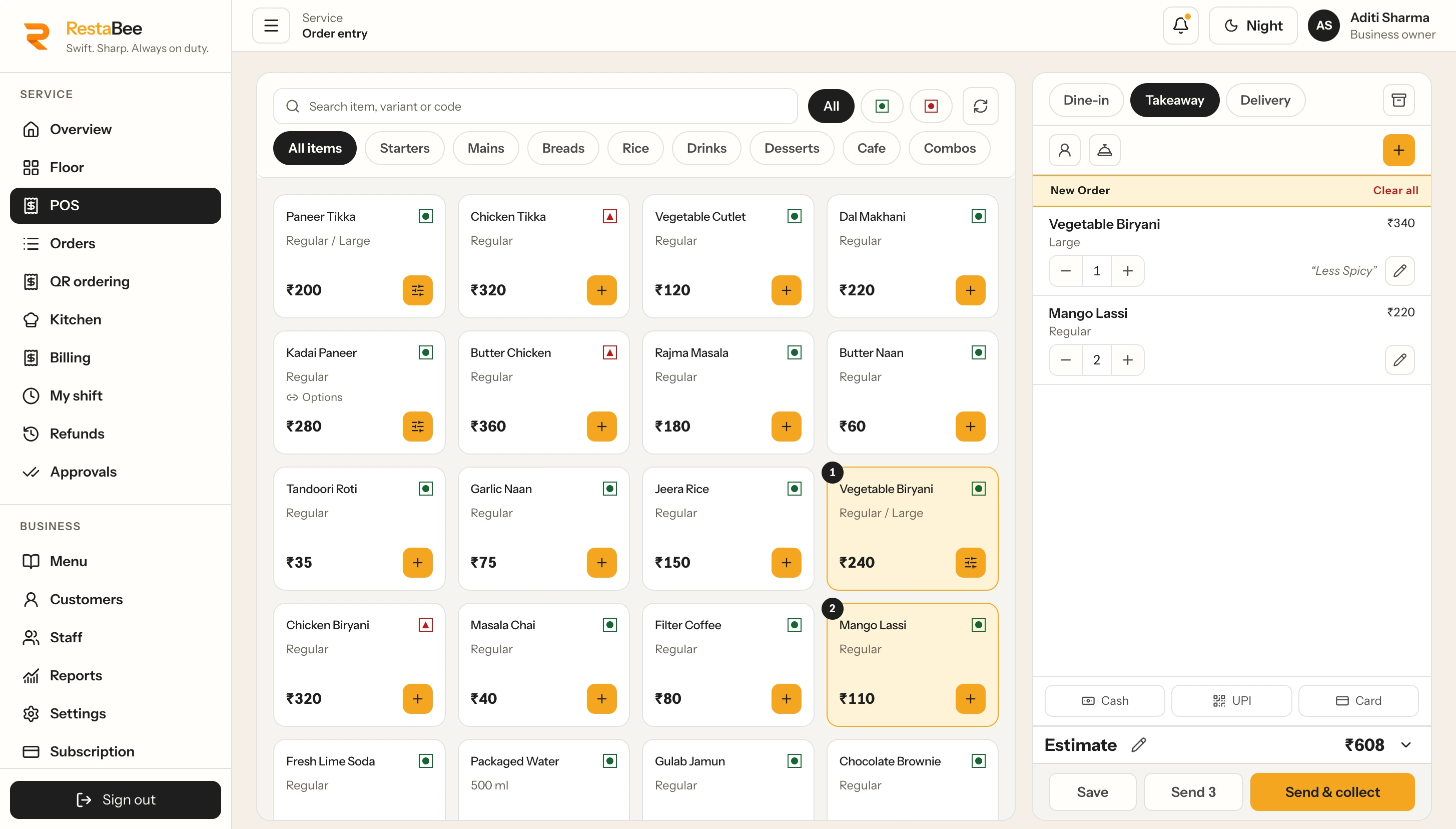
From a catalog entry to an order screen
The central catalog holds the item definition. The POS menu presents available items to staff for order entry, with the selected variant or choice carried into the order.
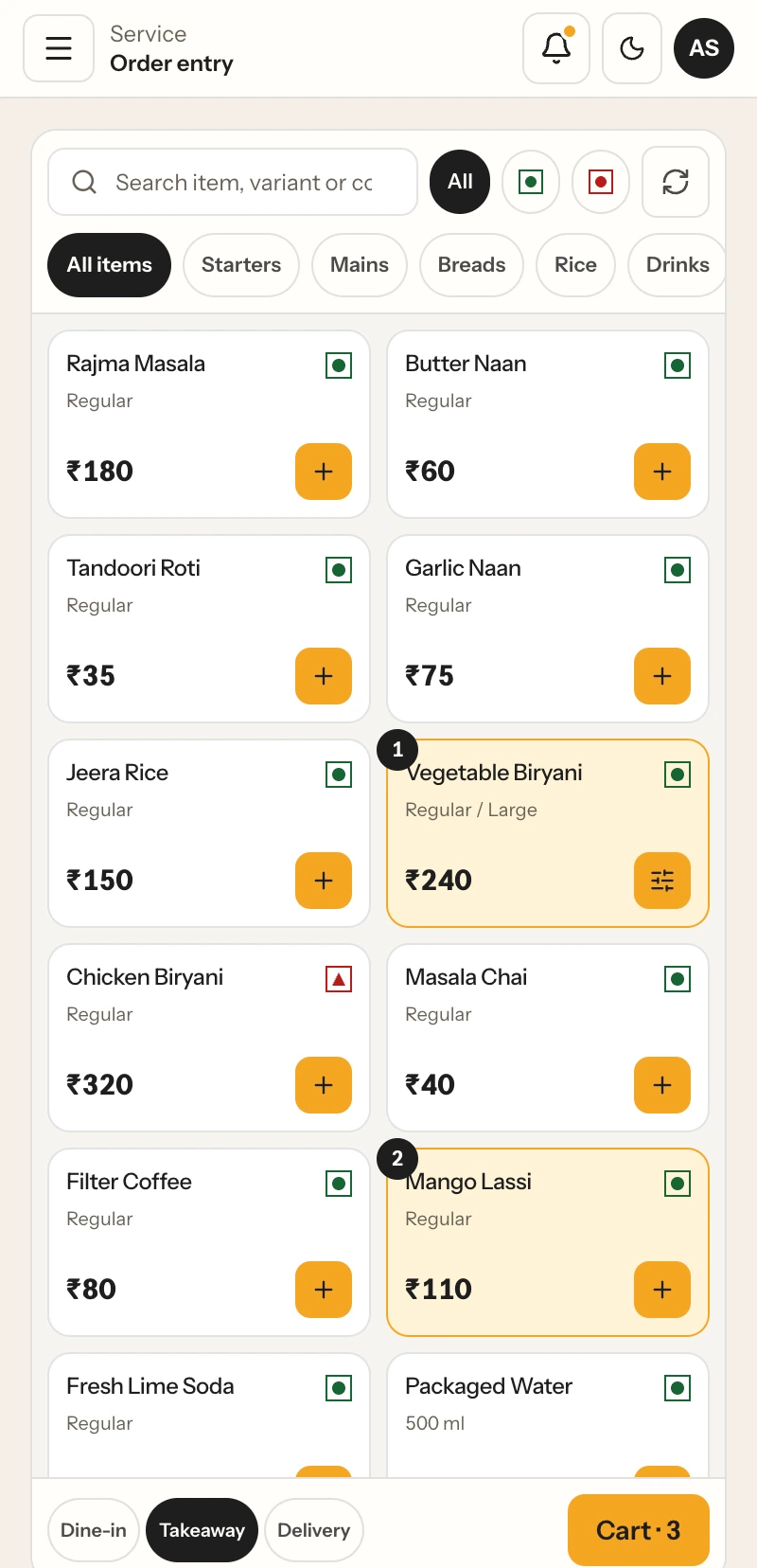
POS menu display
Choose a menu view for service
Use dish photos to help staff scan the menu visually, or keep a compact grid for quick item entry. Each view presents the same menu choices in the POS.
With dish photos

Without dish photos
Menu management questions
Restaurant menu management, explained
Answers about catalog setup, outlet menus, publishing and item choices.
What does restaurant menu management software do?+
Restaurant menu management software organizes menu items, categories, prices, variants, modifier choices and combos. RestaBee also supports review and publication of a central menu to selected outlets.
How does a menu management system for restaurants handle updates?+
A menu management system for restaurants can separate catalog editing, release review and outlet application. RestaBee checks the outlet’s current menu baseline when the team reviews and applies a published change.
Can I manage a central menu for multiple outlets?+
Yes. An owner team can prepare a central catalog, publish a release and choose an outlet to review and apply it. Each outlet can also keep an independent menu or local customizations.
Can every outlet have a different menu?+
Outlets can maintain independent menus. An outlet can also use a published central menu or keep local customizations alongside it, depending on how the business sets up its menus.
What menu details can the system store?+
Menu records can include categories, item details, food classification, variants and prices, modifier groups, combos and preparation-station assignments.
How does a food menu management system connect to order entry?+
RestaBee’s food menu management system keeps menu items, variants, add-ons and kitchen-station assignments in the catalog used by the POS order workflow. Staff select the available choices while entering an order.
How are menu changes published?+
The team edits and saves catalog changes, reviews the release, publishes it, then selects an outlet to review and apply the menu. The outlet’s current baseline is checked during that process.
Can I mark an item unavailable?+
Availability can be changed for an outlet during service. A separate business-level sell-stop can also affect linked outlets, according to the configured access and workflow.
Do menu updates change orders already sent to the kitchen?+
Sent orders and previously issued bills retain the menu details captured when they were created. Menu availability and newer definitions are used for subsequent order entry.
Does menu management connect to kitchen stations?+
Menu items can be assigned to preparation stations. The order workflow uses those assignments to route items to the relevant kitchen queue or configured print route.
A menu workflow for your outlets
See menu setup and publication in RestaBee
Walk through the catalog, a menu release and the outlet review process with the RestaBee team.