RESTAURANT OPERATIONS, CONNECTED

Restaurant management software for daily operations.

Bring order entry, table service, kitchen preparation, billing and business review into one restaurant workspace. RestaBee gives each team a clear view of the work moving through the day.

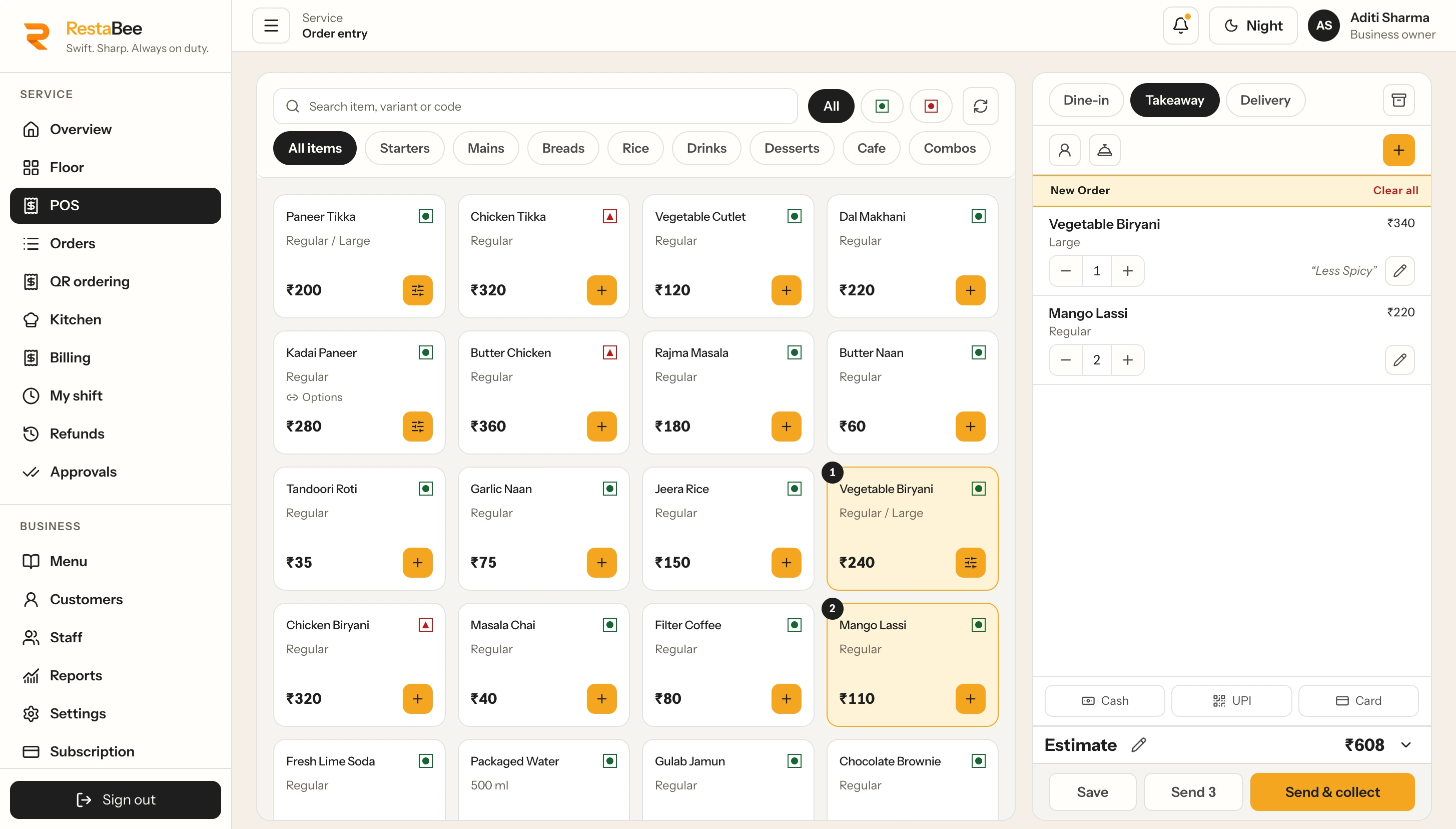
RestaBee POS order entry · desktopSample restaurant data
RestaBee POS order-entry screen on desktop with menu items, order details and payment controls; sample restaurant data.

Menu, active order and payment controls in the staff order-entry workspace.

A WORKSPACE FOR THE WHOLE SERVICE

Restaurant work moves through connected teams.

Restaurant management software brings the operating parts of a service together. Staff take dine-in, takeaway and delivery orders, the kitchen receives preparation details, and the team tracks tables and bills as each party moves through service. Owners and managers can review sales, collections and shifts using the reports available to their role and outlet access.

RestaBee connects those jobs through focused workspaces for order entry, floor service, kitchen tickets, billing, menu management, cash shifts and reports. Each area has a dedicated view, while the order and its preparation context continue through the relevant handoffs. The restaurant team can move between those tasks without treating every part of service as a separate system. When comparing restaurant software solutions, trace how an order reaches the kitchen and bill, then see how staff handle takeaway, shifts and reports.

FROM ORDER TO CLOSE

A clear path through the working day.

A restaurant management system works best when staff can see the next task and the details needed to complete it. RestaBee follows the sequence of a restaurant service, from the first order through preparation, collection and review.

  1. 01

    Take the order

    Enter dine-in, takeaway or staff-entered delivery orders from the POS. Table QR orders can also arrive for staff review.

  2. 02

    Prepare and serve

    Send items to their assigned kitchen stations. Follow ticket progress and keep the service team aware of what is preparing or ready.

  3. 03

    Prepare the bill

    Review the order, apply the configured charges and record payment or an outstanding balance through the billing workflow.

  4. 04

    Review the shift

    Check cash movements, issued sales and recorded collections in the views available to the person and outlet.

PRODUCT WORKSPACES

Open the workspace for the task at hand.

Restaurant software needs to support the details of each role. Explore the focused pages below for the screens and workflows behind each part of RestaBee.

TEAM ACCESS AND OPERATING SCOPE

Give each role a useful view of its work.

Restaurant teams work across the floor, counter, kitchen and office. Role-based access helps keep each person’s available tasks aligned with their responsibilities. Staff can work with the operational views assigned to them, while owners and managers review the reports and outlets within their permitted scope.

RestaBee provides restaurant software for teams in India across web, Android, iPhone, Mac and Windows. These workspaces support order entry, table oversight, kitchen preparation and owner review. Available views and tasks follow the role and outlet permissions configured for each user.

Explore multi-outlet roles and access

A CLOSER LOOK AT THE HANDOFFS

Keep order details moving with the work.

Order context for preparation

The order carries the details the team needs at each stage: its service type, table or takeaway context, selected variants and choices, quantities, preparation notes and assigned kitchen station. Kitchen tickets and the display queue keep those preparation details available to the station team. If an order changes, the workflow records the relevant ticket update so staff can coordinate the next step.

Shift records for later review

During a shift, staff can record opening cash, drawer additions or withdrawals and closing counts. Managers can review cash movement and variance alongside reports for issued sales, confirmed collections, item and category activity, or kitchen service. Each report uses its own date basis and the user’s permitted outlet scope, giving managers a clearer read of what the selected view represents.

SEE THE WORKSPACES

Different screens for different parts of service.

The floor and kitchen views keep their own task context. Open the related pages to see how table status and preparation tickets appear in the product.

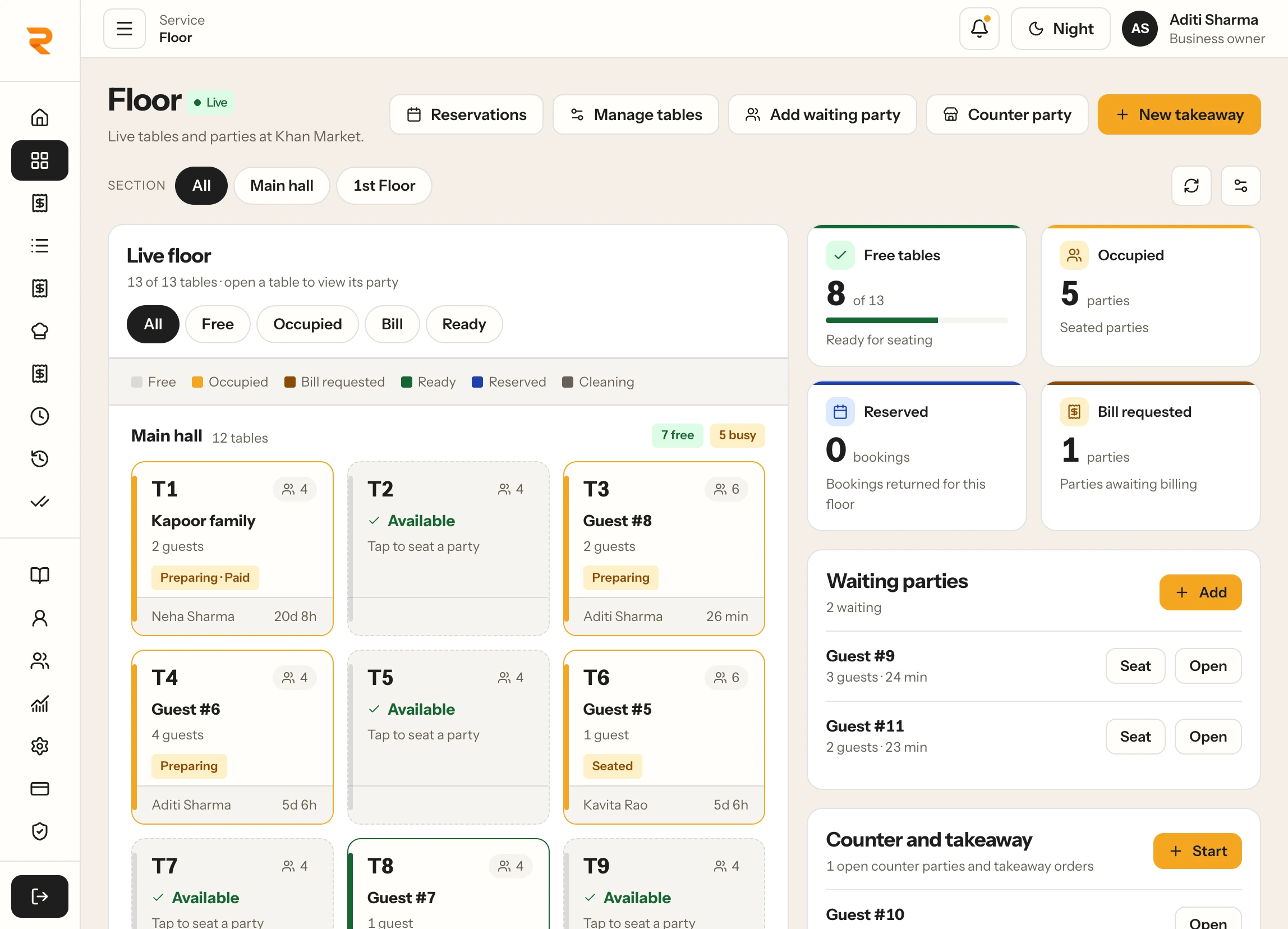
RestaBee Floor · desktopSample restaurant data
RestaBee Floor screen on desktop showing table states, active parties and waiting-party controls; sample restaurant data.

Explore the floor workspace

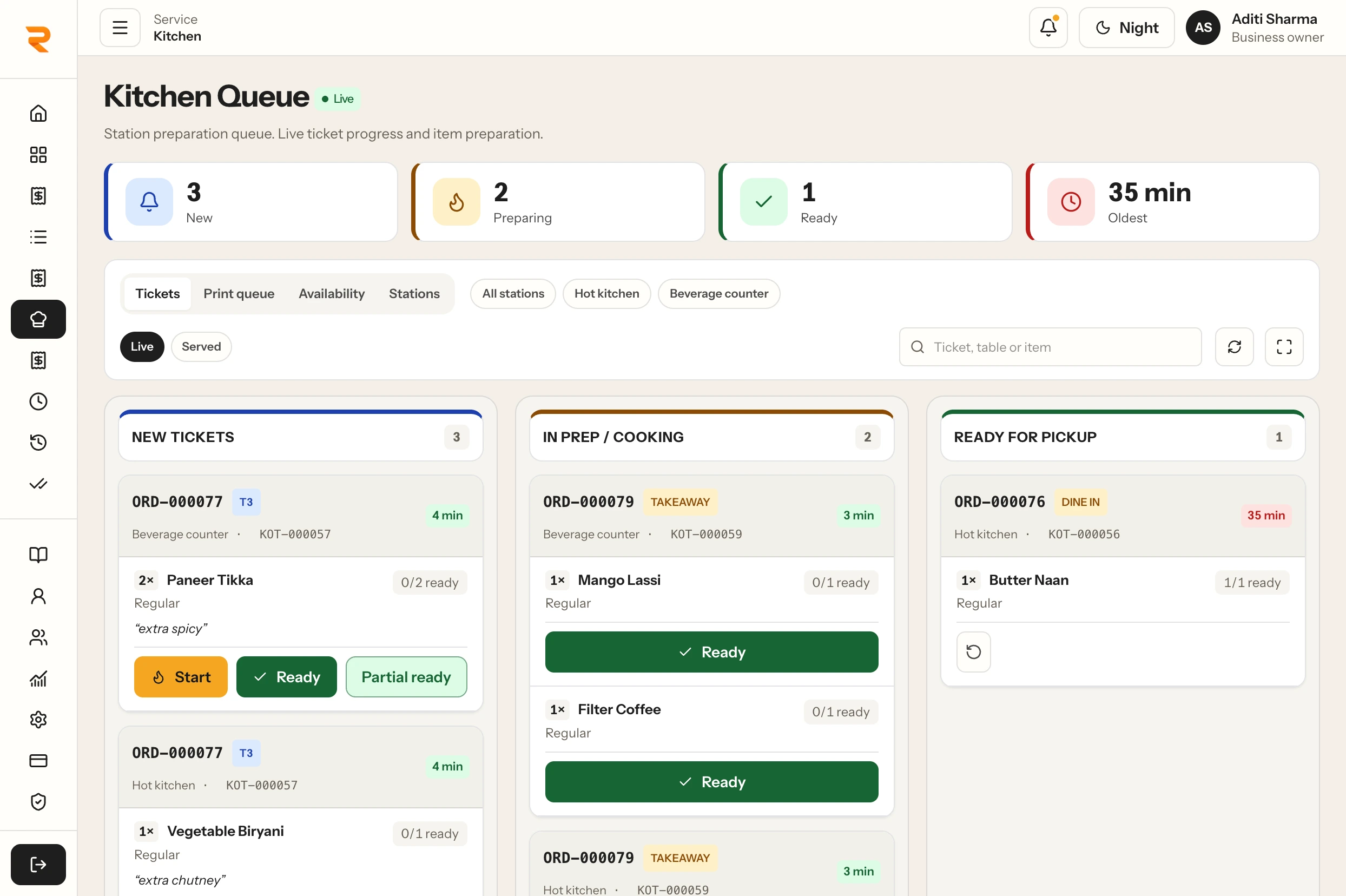
RestaBee Kitchen Queue · desktopSample restaurant data
RestaBee Kitchen Queue screen on desktop showing new, preparing and ready ticket columns; sample restaurant data.

Explore the kitchen display

BUILT AROUND RESTAURANT WORK

Restaurant software for dine-in, takeaway and delivery service.

RestaBee supports dine-in service with table assignment and floor visibility, along with takeaway and staff-entered delivery orders. Table QR ordering lets guests browse a menu and send their selection for staff review before it moves into preparation. The team can follow the relevant order details through kitchen preparation and bill completion.

For a single location, teams can focus on the daily service workflow. Businesses with multiple outlets can coordinate central menu releases, outlet access and reporting scope across locations. Restaurant management software for teams in India should match how orders are taken, how the kitchen is organized and what owners need to review; the linked feature pages explain the specific RestaBee workflows in detail.

Explore Table QR Ordering

COMMON QUESTIONS

Restaurant management software questions.

A quick overview of the workflows and operating scope covered by RestaBee.

What does restaurant management software cover?

It supports the connected work involved in running restaurant service, such as order entry, table management, kitchen preparation, billing, cash shifts, menu control and reports. RestaBee brings these tasks into role-based workspaces.

How is restaurant management software different from a billing-only POS?

A billing-only POS focuses on checkout. RestaBee also supports order entry, table and floor service, kitchen tickets, menu management, cash shift records and business reports across the restaurant workflow.

Can restaurant software handle dine-in, takeaway and delivery?

RestaBee supports dine-in, takeaway and staff-entered delivery orders. Table QR orders can be sent for staff review before preparation.

Can one restaurant management system support multiple outlets?

RestaBee supports central menu releases, outlet access and reporting scope across multiple locations. Outlet-level menus and permissions follow the setup configured for the business.

Which devices can teams use with RestaBee?

RestaBee is available on web, Android, iPhone, Mac and Windows. Available views and tasks depend on the role and outlet permissions configured for each user.

What should restaurant management system software connect?

Restaurant management system software should connect the work that moves through service: orders, tables, kitchen preparation, billing and the records managers review. RestaBee links those workflows through role-based views.

SEE IT IN YOUR SERVICE FLOW

Walk through the restaurant workflows your team uses.

Review order entry, table service, kitchen preparation, billing and business reporting in a RestaBee demo.

Book a demo