
RESTAURANT FLOOR OPERATIONS
A clear view of every table and party.
Restaurant table management software for the pace of service: see floor sections, check table status, seat waiting parties and keep each party’s service details together.
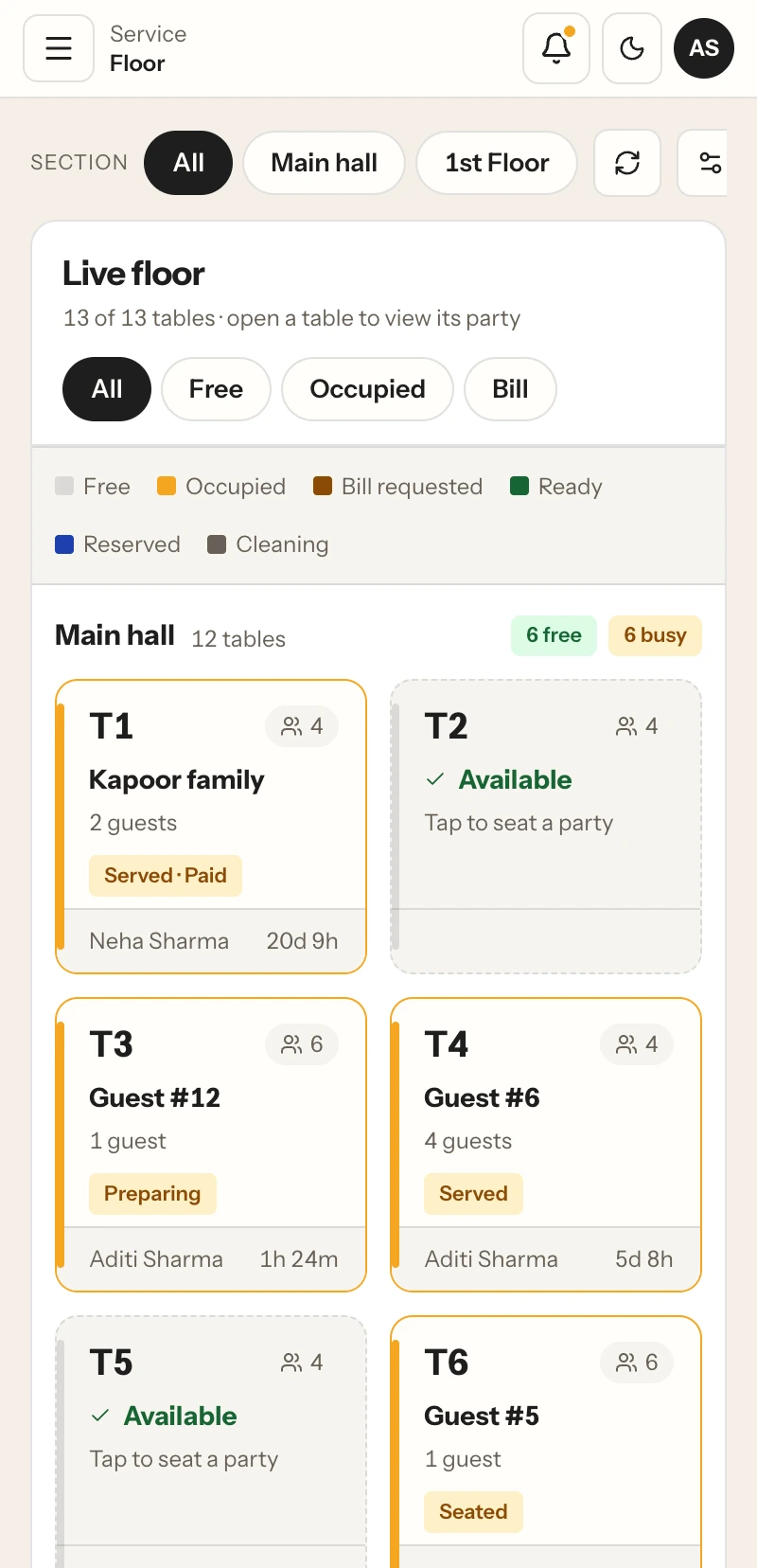
Floor sections, table states and waiting parties in one view.
THE FLOOR, IN CONTEXT
Know where service stands.
Restaurant table management software gives staff quick answers to practical questions: Which tables are free? Who is seated? Has a guest asked for the bill? Which parties are waiting? RestaBee groups those details by the outlet’s configured floor sections, so the team can act from a shared restaurant POS view.
Restaurant table management software helps a team move between the floor and active parties. Staff can review table occupancy, open a party, take an order, update the party’s table, or mark a cleared table for cleaning. The floor view keeps those details together as the team coordinates service.
Restaurant table management software also brings reservation records into staff floor planning. The team can review recorded reservations alongside waiting parties and active table service. Guests use Table QR to browse the menu and submit an order for staff review.
READ THE FLOOR AT A GLANCE
Table status that staff can act on.
Sections and table states make floor work easier to scan. Teams can filter the view, open a party, or move to the next service action from the table card.
- 01
Available
See tables ready for seating and select one when assigning a party.
- 02
Occupied and in service
Review active parties and the table they are using, then open the party to continue service.
- 03
Bill requested
Keep a guest’s request visible so staff can continue to bill preparation.
- 04
Reserved
See reservation records associated with the configured floor and table.
- 05
Needs cleaning
Keep a cleared table out of seating until the cleaning action is recorded.
- 06
Waiting parties
Keep waiting groups visible with guest counts while staff decide where to seat them.
FROM ARRIVAL TO TABLE TURNOVER
A practical floor workflow.
Restaurant table management systems work best when the next action is visible to the people handling the floor. The flow follows the party through seating, service and table release.
- 01
Read the floor
Choose a section and scan available, occupied, reserved and bill-requested tables alongside waiting parties.
- 02
Seat the party
Open a waiting party and assign it to a suitable available table in the selected floor section.
- 03
Continue service
Open the party to record its order, follow preparation and keep the table assignment with the service.
- 04
Close and turn the table
Continue to billing when requested, then record cleaning before returning the table to service.
KEEP THE PARTY TOGETHER
Move between tables and service tasks.
Open a table or party to continue its service. The restaurant table management software keeps the party’s order and table context together as staff handle changes during a shift. When a group needs to move, staff can select an available table and update the party’s seating assignment through the floor workflow.
A table management restaurant workflow also needs clear ownership. Staff can see the team member associated with a party in the floor view, helping the crew coordinate who is looking after a table. Managers can use permitted access to work with the floor and related order records.
When guests ask for the bill, the table can show that request to the team. Staff continue into the bill workflow from the restaurant POS, then mark the table for cleaning after the party leaves. Once cleaning is complete, the table can return to service according to the outlet’s configured floor state.
GUEST ORDERING AND STAFF SERVICE
Connect the floor to table QR ordering.
Guests can scan the QR code assigned to their table to browse the menu and submit an order for staff review. The team sees the order in the restaurant POS workflow and confirms it before preparation. The floor view remains the staff workspace for table status, waiting parties and service coordination.
BUILT AROUND THE RESTAURANT FLOOR
Useful during the whole service.
A restaurant table management app gives the team a useful floor picture at the point where work happens. Restaurant table management software adapts to the screen in use: check a table on a phone or scan sections, parties and floor totals on desktop. Staff can move from table status to order entry, kitchen handoff and billing within the same POS workspace.
COMMON QUESTIONS
Restaurant table management questions.
How the floor view supports everyday restaurant service.
What does restaurant table management software do?
It gives restaurant staff a floor view of configured sections, table states, seated and waiting parties, and related service actions. RestaBee connects this floor work with order entry and billing in the restaurant POS.
Can staff manage different floor sections?
Yes. The floor is grouped into the sections configured for the outlet. Staff can select a section and use table status filters to focus on the part of the floor they are handling.
Can a waiting party be seated at an available table?
Staff can open a waiting party and assign it to an available table through the floor workflow. The party remains associated with its table and service record.
Can staff move a party to another table?
Yes. Staff with floor-move access can select an eligible table and update the party’s seating assignment through the floor workflow.
Does the floor view show bill requests?
Yes. Bill-requested parties can be identified in the floor view, and staff can continue into the restaurant billing workflow to prepare and close the bill.
How does the floor view support reservations?
Staff can review reservation records alongside waiting parties and active table service. Guests can browse the menu and submit a Table QR order for staff review.
Can staff use the table management app on a phone?
RestaBee provides responsive restaurant POS screens for desktop and phone. The floor view adapts to the device so staff can check tables and parties on the screen they use.
How does table management connect to Table QR ordering?
A guest scans the QR code for their table and submits an order for staff review. The order enters the POS service workflow, while staff use the floor view to manage table status and parties.
SEE THE FLOOR WORKFLOW
Walk through table service in RestaBee.
Review table sections, party handling, order entry and billing with your restaurant’s floor setup in view.