
SALES, COLLECTIONS AND OPERATIONS
Restaurant sales reporting software for daily review.
Restaurant sales reporting software brings issued sales, collected payments and operational reports into one place. Choose a report, set its business dates and outlet scope, then review each measure in context.
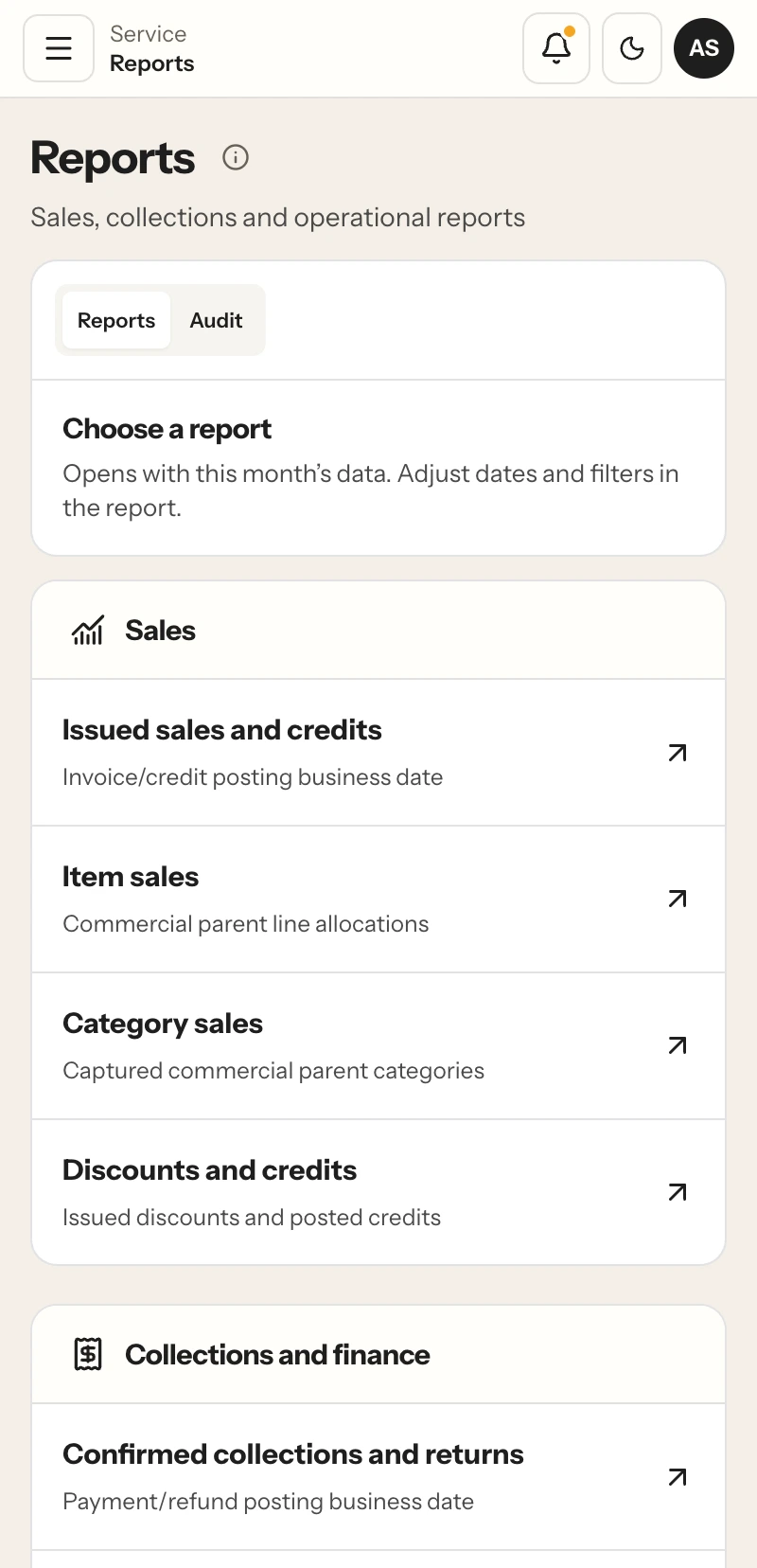
Choose a report for sales, collections or operations, then set its dates and filters.
READ SALES AND COLLECTIONS SEPARATELY
See what was issued and what was collected.
Issued sales and confirmed collections answer different questions. The sales view follows the invoice or credit posting business date. Collections and returns follow the payment or refund posting business date. A bill may be issued on one date and collected later, so its value can appear in each report on the date relevant to that event.
Restaurant sales reporting software gives owners and managers a way to review both measures in their own context. Check the issued amount for the selected period, then open collections to see payments and returns recorded during that period. Use the two views together when a sales total and the money collected do not match on the same day.
A restaurant sales report also helps answer what contributed to the total. Open item or category sales to see the recorded mix, then review discounts, credits, tax or tender details where the selected report provides them. Each view keeps its own date definition and filters so the result can be read on its own terms.
REPORTS BY THE QUESTION YOU HAVE
Reports for sales, finance and service.
The report catalog groups sales, collections and operational views. Available entries depend on each person’s assigned role and outlet access.
Sales
Issued sales and credits
Invoice/credit posting business date.
Item sales
Commercial parent line allocations.
Category sales
Captured commercial parent categories.
Discounts and credits
Issued discounts and posted credits.
Collections and finance
Confirmed collections and returns
Payment/refund posting business date.
Tax components
Issued and credited tax allocations.
Open receivables
Captured collectible balance as of selected end date.
Cash shifts and variance
Captured shift business date.
Tips collected and returned
Separate tip ledger posting date.
Operations
Orders and kitchen service
Captured creation and preparation event dates.
Audit history
Read-only recorded actions in the user’s permitted scope.
FROM REPORT SELECTION TO REVIEW
Set the scope before comparing results.
Restaurant sales reporting software works best when every figure has a clear period, outlet and measure. Follow the same review order each time.
- 01
Choose the report
Start with the question: issued sales, collected payments, item mix or shift activity.
- 02
Set the business dates
Use the report’s own date definition and select the period you intend to review.
- 03
Check outlet and filters
Confirm the permitted outlet, service or order-type filters available in that report.
- 04
Read the measure in context
Compare like periods and scopes, then open item, category, tender or shift details when useful.
DATES, OUTLETS AND PERMISSIONS
Compare the same dates and outlet scope.
Choose the reporting period before comparing totals. Sales and credits use their invoice or credit posting business date; collections and returns use the payment or refund posting business date. A date range that differs between the two reports will produce a different view of activity.
For a restaurant with more than one outlet, check the selected outlet scope alongside the dates. Role permissions control which outlet data and reports each person can open. A manager reviewing one location sees the permitted scope; an owner with broader access can compare the outlets available to their role.
The owner overview and historical reports are snapshots for the selected scope. Check the report name and visible date filters to see how a value was grouped. The restaurant sales dashboard can then support a handover or review with the period and outlet visible alongside the figures.
REVIEW THE CASH CLOSE TOO
Connect reported sales with the shift record.
Operational reporting includes shift activity and variance within the permitted report scope. A sales figure describes the billed activity; a shift close records the drawer count against its expected cash. Review both when the question concerns service totals and the cash handed over at the end of a shift.
RestaBee restaurant sales reporting software brings these views into the same reporting area while preserving their different purposes. Use the cash shift screen for opening float, drawer movements and closing count. Use sales and collection reports for posted bills, payments, returns and the selected period’s item mix.
READ-ONLY CHANGE HISTORY
See the events recorded in your permitted scope.
Audit history is a separate, read-only view of recorded changes and actions. Owners, managers and accountants see events within their permitted scope. It lists the event time, actor, action, record and available reason, with sensitive contact and credential fields removed from event details. Its date range follows the audit event timestamp in the selected timezone; it uses neither invoice nor payment posting dates.
RESTAURANT SALES REPORT QUESTIONS
Make sense of the figures in each report.
Dates, outlet scope, issued amounts, collections and the operational views available in RestaBee.
What does restaurant sales reporting software show?
RestaBee reports include issued sales and credits, item and category sales, discounts, tax, collections, returns and operational measures such as shift variance. The exact filters depend on the selected report and the user’s permissions.
Why are issued sales different from collections?
Issued sales use the invoice or credit posting business date. Collections and returns use the payment or refund posting business date. A bill can be issued on one date and paid later, so the two reports measure different events.
Can a restaurant sales report show item and category sales?
Yes. RestaBee includes item-sales and category-sales reports. Item results use commercial parent line allocations, and category results use the captured commercial parent categories.
Can I filter restaurant POS reports by outlet and date?
Reports use their available date and outlet filters, subject to the user’s permitted data scope. Check the selected filters before comparing results across periods or locations.
Does RestaBee work as restaurant analytics software?
RestaBee provides reports for sales, collections, items, categories and operations. The owner overview and historical report views are snapshots for their selected scope.
Is there a restaurant sales dashboard for daily review?
The owner overview brings selected business measures into a summary view. Open a specific report when you need its date definition, outlet filter or item and collection details.
Can reports show cash shift variance?
Operational reports include shift activity and variance within the permitted scope. The My Shift workflow records opening cash, drawer movements and the closing count.
Are the report values live?
The owner overview and historical reports are snapshots for the selected scope. Read the report’s period and filters when reviewing a figure or comparing it with another view.
Can I review an audit report?
RestaBee provides a separate, read-only Audit history view for recorded changes and actions visible to the user’s role. It shows event time, actor, action, record and available reason, uses the event timestamp in the selected timezone and removes sensitive contact and credential fields from event details.
SEE THE REPORT WORKFLOW
Review reports against your outlet setup.
See restaurant sales reporting software with the dates, outlets and measures your team reviews.